Prepare an engagement letter
Choose a Sign library letter, fill its details, adjust the wording and set up the practice letterhead.
Source reviewed Product documentation
Open the letter Library. Browse All letters or a section, and open one to read it. The library presents letters in the style set for their type under Branding. Use a library letter as it stands, or save a practice copy under My letters before changing language the whole team should reuse.
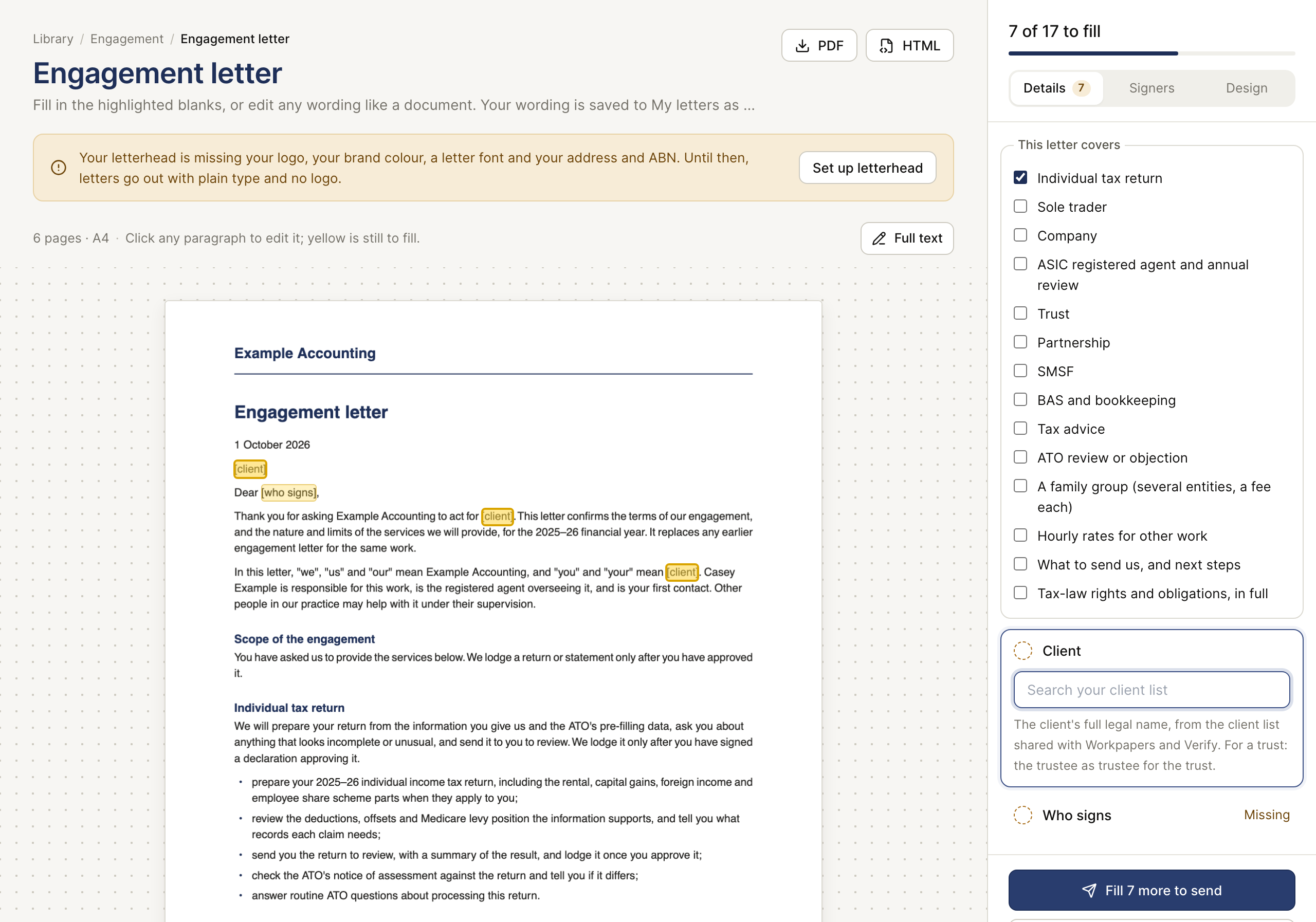
On the letter, fill the highlighted blanks. The right panel separates Details, Signers and Design. Choose the client from the shared list, check who signs for a company or trust, and read the whole document before sending. Click a paragraph to edit it, or use Full text for larger wording changes. The page shows how many fields remain and changes to your wording save into My letters as you edit.
An owner or admin can open Branding to set the letterhead, colours and style. The editor warns when logo or practice details are missing; the letter can then go out in plain type. Check the final PDF, including the signer names and fee table, before using Send for signature.